How to Delete Wolf Plus
Published by: BRAINBOX DESIGN SOLUTIONS LLCRelease Date: July 01, 2020
Need to cancel your Wolf Plus subscription or delete the app? This guide provides step-by-step instructions for iPhones, Android devices, PCs (Windows/Mac), and PayPal. Remember to cancel at least 24 hours before your trial ends to avoid charges.
Guide to Cancel and Delete Wolf Plus
Table of Contents:



Wolf Plus Unsubscribe Instructions
Unsubscribing from Wolf Plus is easy. Follow these steps based on your device:
Canceling Wolf Plus Subscription on iPhone or iPad:
- Open the Settings app.
- Tap your name at the top to access your Apple ID.
- Tap Subscriptions.
- Here, you'll see all your active subscriptions. Find Wolf Plus and tap on it.
- Press Cancel Subscription.
Canceling Wolf Plus Subscription on Android:
- Open the Google Play Store.
- Ensure you’re signed in to the correct Google Account.
- Tap the Menu icon, then Subscriptions.
- Select Wolf Plus and tap Cancel Subscription.
Canceling Wolf Plus Subscription on Paypal:
- Log into your PayPal account.
- Click the Settings icon.
- Navigate to Payments, then Manage Automatic Payments.
- Find Wolf Plus and click Cancel.
Congratulations! Your Wolf Plus subscription is canceled, but you can still use the service until the end of the billing cycle.
How to Delete Wolf Plus - BRAINBOX DESIGN SOLUTIONS LLC from Your iOS or Android
Delete Wolf Plus from iPhone or iPad:
To delete Wolf Plus from your iOS device, follow these steps:
- Locate the Wolf Plus app on your home screen.
- Long press the app until options appear.
- Select Remove App and confirm.
Delete Wolf Plus from Android:
- Find Wolf Plus in your app drawer or home screen.
- Long press the app and drag it to Uninstall.
- Confirm to uninstall.
Note: Deleting the app does not stop payments.
How to Get a Refund
If you think you’ve been wrongfully billed or want a refund for Wolf Plus, here’s what to do:
- Apple Support (for App Store purchases)
- Google Play Support (for Android purchases)
If you need help unsubscribing or further assistance, visit the Wolf Plus forum. Our community is ready to help!
What is Wolf Plus?
Wolf plus electric truck 360° 4k:
*** The Wolf Plus App was created by golfers for golfers ***
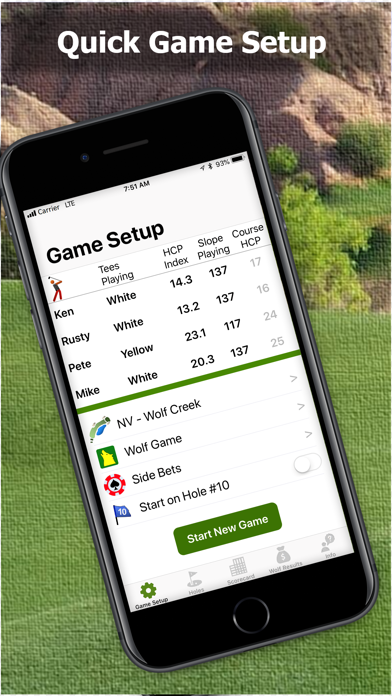
The user interface is purposely designed to be simple to use for quick and easy score entry. An emphasis in the design of the App was ease of use and sunlight readability. Stroke differential between players is automatically calculated based on their handicap index and slope of the tees playing. On each hole, the Wolf Plus App indicates how many strokes each player gets from the others. Then you simply enter how you are playing the hole (e.g. Team, Lone Wolf, Peeking Wolf, Blind Wolf), select your teammate, enter gross scores, and the Wolf Plus App does the rest.
In the game setup, you determine what you are wagering per dot, if holes carry or not, how many dots each Wolf format is worth, and various side bets (e.g. greenies, fewest putts per round, 3+ putts and polies). You pick from your list of stored courses and select tees each person is playing.
At the end of the round, the Wolf Plus App provides stats such as Adjusted Score (for inputting into your handicap system), total putts, number of 3 putts, Greens in Regulation, Putts for Greens in Regulation, and number of Fairways hit. All with minimal entry on each hole!