Clean Camera for Stream Feed is a photo & video app developed by Thomas Backes. Available for $2.99, it was updated to v1.90 on September 28, 2022, and currently holds a 4.6 out of 5 rating based on 57 reviews. Before downloading, make sure your device has at least 11 MB of free space and runs Android 12.4+ or iOS 13.4+.
Get a clean feed for OBS
Video: Clean Camera for Stream Feed Overview
Description
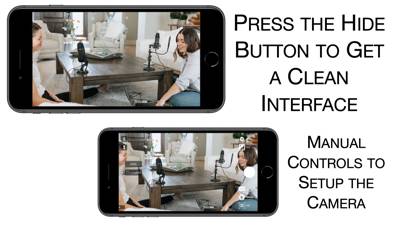
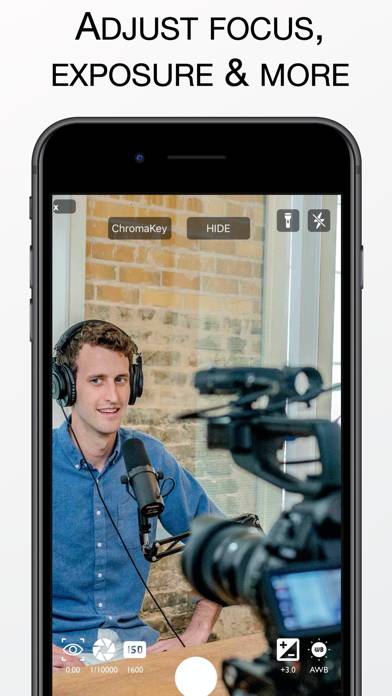
Clean Camera provides manual controls for your camera. You can set the exposure, focus, shutter speed, and ISO setting. In addition, Clean Camera provides a clean interface though the hide button.
Clean Camera for Stream Feed can be played on Windows and macOS using Android emulators such as BlueStacks. Download an APK version and follow our BlueStacks installation guide to get started. For help with downloading or installing APK files, visit our forums.
User Reviews and Ratings
★★★★☆Solid
Great app, I’m using it with a HDMI adapter to stream a school play with a iPhone 13 Pro Max. However, it would very nice if I had the option of changing the camera. It seems to only work using the 1x camera. Also, a bug: the zoom numbers don’t work past 9.9. When you get to 10 it shows 1…
★★★★★Perfect for my job, CLEAN CUT BBY.
Awesome, I use OBS and use 3-4 cameras at a time with my ATEM mini for work (mock interviews and feedback) been trying to figure out for a couple of years now how I could use my iPhones for some of the video portions, and this app just popped up and is exactly what I needed. But also actually crazy that I’m not able to do this on my phone already or any app isn’t capable of doing this! So thank you!!!! Big ups. Also might even use this for a DIY baby cam!
★★★☆☆Need the iPad version.
On iPad, the compatibility mode leaves the 2 buttons at the corner shown to rotate and to full screen.
★★★★★So far so good!
Quick and easy to use. Up and running in mere minutes. Allows iPad and iPhone to input video into ECamm via usb direct input.
Can’t confirm frame rates or anything, but does have ability to change white balance, frame rate, auto or manual focus etc.
I did have to crop the shot a tiny bit to enlarge in ECamm. Haven’t tried on others, but Mac found it as an additional camera Easy.
Can’t go wrong for the price.
Thank you developer !!
★★★★★Amazing for Streaming Live on Ecamm
I needed my phone to stream clean video footage when going live using Ecamm, and was blown away. No need to crop. Just hit the hide button and now I have a dope second angle cam. Why not get the best out of my 11 pro max with its amazing cam quality.