Published by Michael Mattesco Horta on Jul 11, 2023
Genre: Medical
Ratings: 4.40
Version: 2.7
Updated: Oct 04, 2024
Downloads: 1,318
Code Blue - CPR Timer is a medical app developed by Michael Mattesco Horta. Available for $1.99, it was updated to v2.70 on October 04, 2024, and currently holds a 4.4 out of 5 rating based on 1.2K reviews. Before downloading, make sure your device has at least 42 MB of free space and runs Android 13+ or iOS 14.0+.
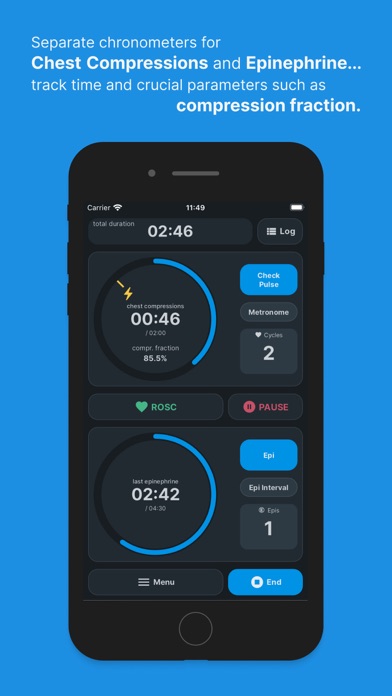
High Performance CPR Timer
Video: Code Blue Overview
Description
Developed and extensively tested to provide crucial information in an efficient and precise manner, assisting one of the most stressful and time critical occurrences in the healthcare setting.
Code Blue - CPR Timer may be playable on Windows and macOS using Android emulators such as BlueStacks. Follow our BlueStacks installation guide to get started. Looking for Code Blue APK? Visit our forums for help finding authorized downloads, installing APK files, and troubleshooting installation issues.
User Reviews and Ratings
★★★★☆Nearly Perfect
Love this app, but is there any chance you can get the metronome to be better? It’s probably a looped sound, but where the loop ends the beat is audibly off.
★★★★☆Great, but not yet there
Has a good layout and easy to use. In addition to traumas. However, it needs a place to document vitals and quick clicks for IV/IO/etc. placement and size. Then for the iPad, a running record on the main screen would be really nice. Other than that. Really do enjoy the app!
★★★★☆Super Helpful!
I’ve used this app to help run multiple codes and it has been fantastic!
I would love the ability to make a comment about medication dosage, defib energy, or even a “event comment” option to dictate items that are not defaulted. Also, the option to adjust the log in case a documentation error was made may be beneficial too.
Thanks for the great app!
★★★★☆Solid code tracker after you fiddle with the settings
The default settings in the app make it initially seem frustrating to use (e.g. excessive notifications on the screen when you start the code), but fortunately you are able to change the settings in-app to make using it much more streamlined. Also, make sure you use “quick start” instead of the “start code” button– “quick start” will start the timers automatically, whereas “start code”will require you to start the timers yourself (a needless distraction during an actual code). Overall a strong a