Helium AUv3 MIDI Sequencer
Published by Limelight Software on Apr 22, 2021
Genre: Music
Ratings: 4.52
Version: 1.49
Updated: Sep 21, 2024
Downloads: 436
Helium AUv3 MIDI Sequencer is a music app developed by Pocketscom. Available for $8.99, it was updated to v1.49 on September 21, 2024, and currently holds a 4.52 out of 5 rating based on 42 reviews. Before downloading, make sure your device has at least 84 MB of free space and runs Android 11+ or iOS 12.0+.
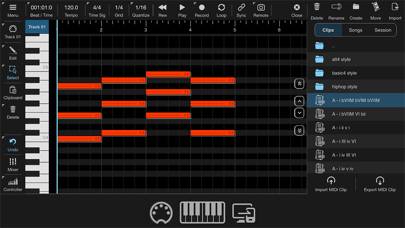
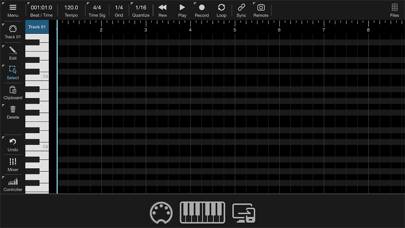
Video: Helium AUv3 MIDI Sequencer Overview
Description
Helium is a lightweight AUv3 MIDI sequencer plugin designed specifically for AUM. It supports up to 16 tracks of unlimited length with the ability to direct output to 16 channels on up to 16 MIDI output ports.
Show more
Download Helium AUv3 MIDI Sequencer
Scan to Get the App!

Using Helium AUv3 MIDI Sequencer on PC or Mac
Helium AUv3 MIDI Sequencer can be played on Windows and macOS using Android emulators such as BlueStacks. Download an APK version and follow our BlueStacks installation guide to get started. For help with downloading or installing APK files, visit our forums.
User Reviews and Ratings
★★★★★ Intuitive, practical and user friendly
Needed an app to import MIDI files generated by Piano Motifs and play them in AUM. You can do this with one instance of Helium in AUM. I import a folder with the Piano Motifs clips into the Media Bay and then import the MIDI clips into different tracks (channels in AUM). Sync and then play! A breeze to use.
★★★★☆ Almost perfect
Just wish i could view more ghost tracks at the same time, and they were more visible so i could see all the midi note on different tracks on the same piano roll with different colors. Other than that, its useful.
★★☆☆☆ Big disappointment!
I do not know what “AUM” is. I was hoping I could create music within the app itself; however, where is the sound? Volume is turned up and I do not hear anything!
Developer has many videos on YouTube; however, I do not have time to listen to them all, which would probably take hours. Don’t get this unless you are a professional musician!
★★☆☆☆ Show us how to use the chord track…
(No, you didn’t. )
I hit velocity, and the following behavior is nothing like what you demonstrated. I turn on chord track and it doesn’t make a difference. I double tap, or hold on the blank chord track bar and nothing is shown.
Please, please, show us from absolute scratch , with nothing preset in your demonstration and at the beginning of the tutorial how to get the and add chords in the track.
★★★★★ Essential for previewing midi loops
Read all reviews
Been using Helium for a year now, It has become a staple in my AUM setup - using the midi browser to trigger loops from my large collection of midi basslines, melodies and drums loops. Helium makes it easy to preview loops with minimal setup.
Similar Music Apps
Magma : sound as matter
Top #99 in Music Apps
SWAM Double Bass

Microphone Voice Recorder-Pro

AnXiens

Oof Piano for Roblox
ChordInvert