Personal Info Keeper
Published by High Criteria Inc on Dec 14, 2011
Genre: Productivity
Ratings: 4.00
Version: 1.3.3
Updated: Jul 27, 2020
Downloads: 694
Personal Info Keeper is a productivity app developed by High Criteria. Available as a free download, it was updated to v1.30 on July 27, 2020, and currently holds a 4 out of 5 rating based on 2 reviews. Before downloading, make sure your device has at least 3 MB of free space and runs Android 7+ or iOS 8.0+.
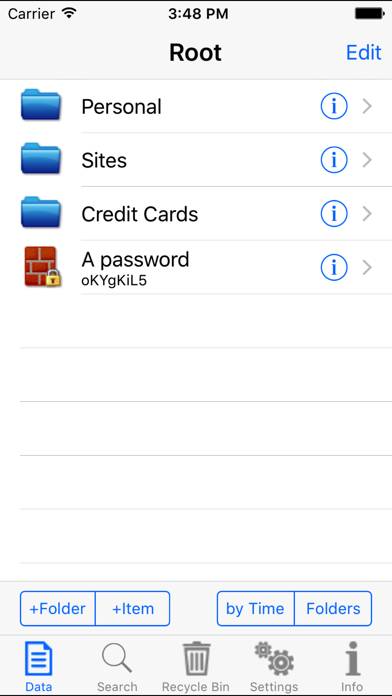
Description
Personal Info Keeper for iPhone (iPIK) is an application for those who appreciate their time and want to safely store, organize and access different types of personal information in the most convenient way.
Show more
Download Personal Info Keeper
Scan to Get the App!

Using Personal Info Keeper on PC or Mac
Personal Info Keeper can be played on Windows and macOS using Android emulators such as BlueStacks. Download an APK version and follow our BlueStacks installation guide to get started. For help with downloading or installing APK files, visit our forums.
User Reviews and Ratings
★★★★★ Personal Info keeper
I've used this app on the PC for over 15 years and it has served me well. Keeps all my passwords right at my finger tips securely maintained. Now I find that it can be used on the iPad (i have iPad 3) even though made for the iPhone. Transfer existing password data file thru iTunes from the PC to the ipad and it works just great. I rate it +5 as I find no problems at all working perfect. Less hassle than 1password that I also use on the iMac and iPad. Can password protect any data item and also
★★★☆☆ Selection function/field within PIK limited.
Read all reviews
Does not select complete user names or passwords if they contain special characters, including periods and dashes. Whatever data is selected, selection can’t be expanded. Selection field just closes. The data selection function works fine outside of PIK.
Similar Productivity Apps
Unplug Screentime
PDF Photos+ Scanner, Editor
Florence Assistant - Premium
PDF to Numbers by PDF2Office
France Agenda
Smart Copy: Clipboard History