Pyware 3D Viewer is a music app developed by Pygraphics. Available for $2.99, it was updated to v1.00 on August 23, 2019, and currently holds a 2.89 out of 5 rating based on 47 reviews. Before downloading, make sure your device has at least 709 MB of free space and runs Android 9+ or iOS 10.0+.
Video: Pyware 3D Viewer Overview
Description
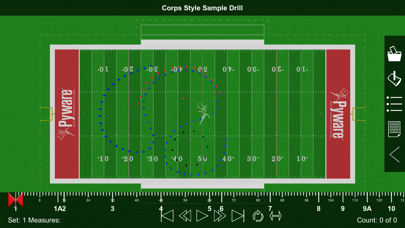
Pyware 3D Viewer allows you to take your Pyware 3D® drills anywhere! Designed for both instructors and performers, our Pyware 3D Viewer app eliminates the need to print anything.
Pyware 3D Viewer may be playable on Windows and macOS using Android emulators such as BlueStacks. Follow our BlueStacks installation guide to get started. Looking for Pyware 3D Viewer APK? Visit our forums for help finding authorized downloads, installing APK files, and troubleshooting installation issues.
User Reviews and Ratings
★★★★★College Use
I am my students have been using Pyware for the last 4 years and had great success learning our drills. Has save use many hours and minutes.
★★★★☆Great app. Looking for more features
App works for what it says it does. Easily set up and adjusted for individual wants and needs.
I would like to see in a future update, movement directions/pathways. In comparing with other apps, I found UDBapp has some of those features.
An update that I have not seen that would be nice, is section selection. The ability to isolate specific sections would be useful.
★★☆☆☆QR code reader needs updating
If you have an iPhone 6 or later, the only way to upload the drill is to type in the url. The app can’t access the camera.
★★☆☆☆Bugs?
App worked fine on iPod touch, but when I tried using it on my iPhone 6 it’s too much to handle? No access to camera so I can’t scan qr codes. No notification to access camera, and the app doesn’t even show up in settings. What gives?
★★☆☆☆-
Can’t scan we code and can’t enable camera because app doesn’t show in settings there went 3 dollars I guess can’t use it