Sound Byte Cart Machine App
Published by Black Cat Systems on Oct 30, 2010
Genre: Music
Ratings: 4.01
Version: 2.2
Updated: Jul 20, 2022
Downloads: 1,013
Sound Byte Cart Machine App is a music app developed by Black Cat Systems. Available for $5.99, it was updated to v2.20 on July 20, 2022, and currently holds a 4.01 out of 5 rating based on 151 reviews. Before downloading, make sure your device has at least 3 MB of free space and runs Android 8+ or iOS 9.0+.
Sound files at your fingertips
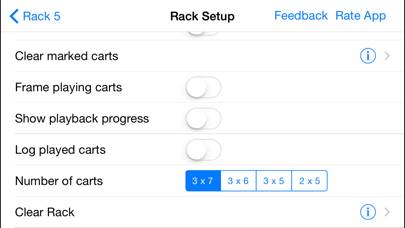
Description
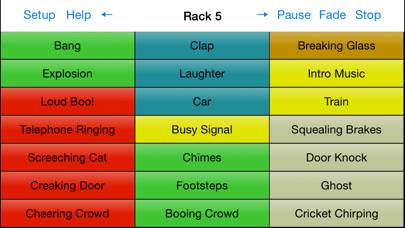
Looking for a way to play sound clips at a theater or sporting events, as a DJ, or at other events? Don’t want to lug a computer around with you? With Sound Byte, the so-called "cart machine" used at radio stations in the past is now available for the iPad, iPhone and iPod Touch.
Show more
Download Sound Byte Cart Machine App
Scan to Get the App!

Using Sound Byte Cart Machine App on PC or Mac
Sound Byte Cart Machine App can be played on Windows and macOS using Android emulators such as BlueStacks. Download an APK version and follow our BlueStacks installation guide to get started. For help with downloading or installing APK files, visit our forums.
User Reviews and Ratings
★★★★★ Great app
I’ve been using the PC version in the theater for years and really love it. Now using the iPhone version when I need sounds in a quick/emergency situation.
Just need to figure out where it hides the files…so I can delete a couple of dupes.
★★☆☆☆ Still crashes
Please fix. Still crashes on music library pick in cart
★★☆☆☆ No change
Come on. Is this a joke. Fix it please. Fully crashes.
★★★★★ Music format radio show invaluable aid.
This is the second time I had to get this app because ofApples upgrade a few years ago my old iPad was outdated. It’s an amazing app, sometimes because of Apple iTunes it’s a little difficult to get new sound events into it but I always seem to figure it out eventually, it’s just never like the instructions on the app. They perhaps could be updated please.
I use this app for both bed music which I play under my mic breaks and I also use it for short little sound events in between songs. It is
★★★☆☆ Great to Use, Difficult to Setup
Read all reviews
Love using this app, but setting up a new show is extremely difficult. You can’t import tracks while on an iPad. You have to connect to a PC or Mac in order to get the files where you can actually import them. If there was a way to use this on the iPad alone, it would be 5 stars.
Similar Music Apps
Stria

inReverse Party Game
Top #33 in Music Apps
Jazz Theory Quiz
Beginner Bass method HD
Spectre
Visual Piano