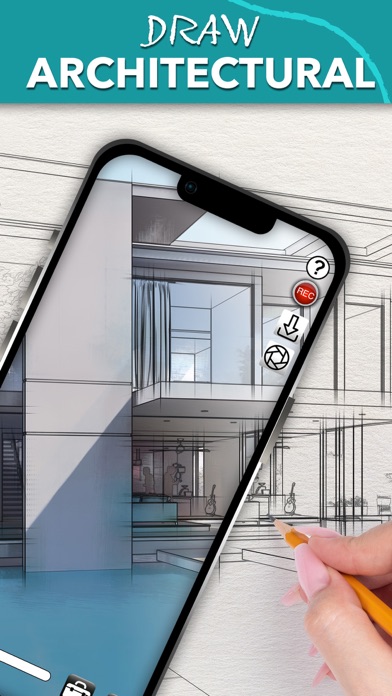
Camera Lucida™: AR Drawing

Published by Big Idea Design LLC on Mar 20, 2010
Camera Lucida™: AR Drawing icon

Genre: Graphics & Design

Ratings: 4.83

Version: 17.1

Updated: Jul 06, 2024

Downloads: 2,394

Camera Lucida™: AR Drawing is a graphics & design app developed by Camera Lucida. Available for $19.99, it was updated to v17.10 on July 06, 2024, and currently holds a 4.83 out of 5 rating based on 1.5K reviews. Before downloading, make sure your device has at least 55 MB of free space and runs Android 11+ or iOS 12.0+.

Masterful drawing in minutes‪!‬

Video: Camera Lucida™: AR Drawing Overview

Description

Draw Like a Pro with Camera Lucida™: AR Drawing One-Time Purchase: No subscriptions! Buy it once and use on your devices.
Show more

Available In-App Purchases

Auto-Correct For Perspective

$4.99

Download Camera Lucida™: AR Drawing

Scan to Get the App! QR code for Camera Lucida™: AR Drawing

Using Camera Lucida™: AR Drawing on PC or Mac

Camera Lucida™: AR Drawing may be playable on Windows and macOS using Android emulators such as BlueStacks. Follow our BlueStacks installation guide to get started. Looking for Camera Lucida™: AR Drawing APK? Visit our forums for help finding authorized downloads, installing APK files, and troubleshooting installation issues.

User Reviews and Ratings

★★★★★ The best
I use this app frequently and it works perfectly. Excellent customer support and a great Facebook group
★★★★★ Love Camera Lucida!
Very Easy to use and makes short work of big projects!
★★★★★ Absolutely great app!
This actually does do everything you wanted to do. It gives you a zoom control. It gives you control over Opacity And they can correct for reciprocity. I’ve used other programs This one by far is the best one I’ve used.
★★★★★ Fantastic tool!
I have found this to be a FANTASTIC tool for my pencil drawings. I can get precise perspectives and placement of eyes and detail that can make or break a piece of art. I’m a BIG detail artist and find that this has been so helpful to me. I have used an opaque projector for years but this app has almost made that piece of equipment obsolete and has sure taken preparation steps away. No more printing a photo to use…just download and go! Its AWESOME!!
★★★★★ Easily the best drawing aid on iOS
The title says it all. Don’t be fooled by the imitators out there. This is the OG app and it has made my art easier to make and better than I could do without it.
Read all reviews

Similar Graphics & Design Apps

Blur Photo· screenshot
Blur Photo·
Spark Creative Play screenshot
Spark Creative Play
Top #99 in Graphics & Design Apps
ibis Paint screenshot
ibis Paint
Vectorize! screenshot
Vectorize!
Wallpapers Central screenshot
Wallpapers Central
Aurora: Color Picker screenshot
Aurora: Color Picker