Comment supprimer Atomizer AUv3 Plugin
Publié par : PocketscomDate de sortie : August 27, 2023
Besoin d'annuler votre abonnement Atomizer AUv3 Plugin ou de supprimer l'application ? Ce guide fournit des instructions étape par étape pour les iPhones, les appareils Android, les PC (Windows/Mac) et PayPal. N'oubliez pas d'annuler au moins 24 heures avant la fin de votre essai pour éviter des frais.
Guide pour annuler et supprimer Atomizer AUv3 Plugin
Table des matières:
Atomizer AUv3 Plugin Instructions de désabonnement
Se désinscrire de Atomizer AUv3 Plugin est simple. Suivez ces étapes en fonction de votre appareil :
Annulation de l'abonnement Atomizer AUv3 Plugin sur iPhone ou iPad :
- Ouvrez l'application Paramètres.
- Appuyez sur votre nom en haut pour accéder à votre identifiant Apple.
- Appuyez sur Abonnements.
- Ici, vous verrez tous vos abonnements actifs. Trouvez Atomizer AUv3 Plugin et appuyez dessus.
- Appuyez sur Annuler l'abonnement.
Annulation de l'abonnement Atomizer AUv3 Plugin sur Android :
- Ouvrez le Google Play Store.
- Assurez-vous que vous êtes connecté au bon compte Google.
- Appuyez sur l'icône Menu, puis sur Abonnements.
- Sélectionnez Atomizer AUv3 Plugin et appuyez sur Annuler l'abonnement.
Annulation de l'abonnement Atomizer AUv3 Plugin sur Paypal :
- Connectez-vous à votre compte PayPal.
- Cliquez sur l'icône Paramètres.
- Accédez à Paiements, puis à Gérer les paiements automatiques.
- Recherchez Atomizer AUv3 Plugin et cliquez sur Annuler.
Félicitations! Votre abonnement Atomizer AUv3 Plugin est annulé, mais vous pouvez toujours utiliser le service jusqu'à la fin du cycle de facturation.
Comment supprimer Atomizer AUv3 Plugin - Pocketscom de votre iOS ou Android
Supprimer Atomizer AUv3 Plugin de l'iPhone ou de l'iPad :
Pour supprimer Atomizer AUv3 Plugin de votre appareil iOS, procédez comme suit :
- Localisez l'application Atomizer AUv3 Plugin sur votre écran d'accueil.
- Appuyez longuement sur l'application jusqu'à ce que les options apparaissent.
- Sélectionnez Supprimer l'application et confirmez.
Supprimer Atomizer AUv3 Plugin d'Android :
- Trouvez Atomizer AUv3 Plugin dans le tiroir de votre application ou sur l'écran d'accueil.
- Appuyez longuement sur l'application et faites-la glisser vers Désinstaller.
- Confirmez pour désinstaller.
Remarque : La suppression de l'application n'arrête pas les paiements.
Comment obtenir un remboursement
Si vous pensez avoir été facturé à tort ou si vous souhaitez un remboursement pour Atomizer AUv3 Plugin, voici la marche à suivre :
- Apple Support (for App Store purchases)
- Google Play Support (for Android purchases)
Si vous avez besoin d'aide pour vous désinscrire ou d'une assistance supplémentaire, visitez le forum Atomizer AUv3 Plugin. Notre communauté est prête à vous aider !
Qu'est-ce que Atomizer AUv3 Plugin ?
Atomizer by 4pockets - real time auv3 audio splicer - tutorial for the ipad:
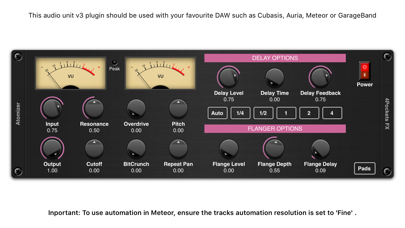
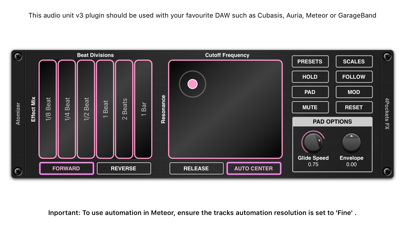
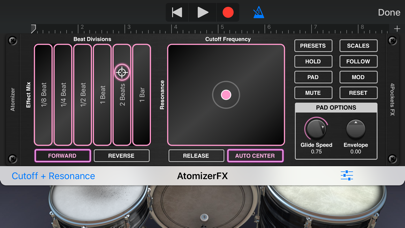
Atomizer is a great plugin for adding beat synced glitch and stuttering, pitch shifting and various forms of filtering effects to your songs. The plugin splices incoming audio into samples divisible by the current tempo and allows you to play them as a continuous seamless loop blended over the original audio. You do this using the grid of vertical finger pads, each representing samples of increasing lengths. Simply tap and hold one of these pads to repeat the currently playing section of incoming audio. Slide your finger up and down to fade in and out the repeated sample. Slide left and right to increase or decrease the sample length of the currently playing sample.
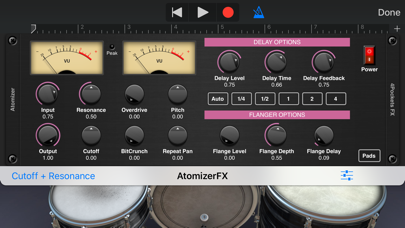
A customisable digital delay section allows held samples to trail out on release, automatically syncing it's delay times with the loop size (when set to Auto).
The second finger pad (XY pad) defaults to a LP/HP filter sweep, but can be configured to manipulate effects such as real time pitch shifting, panning, flanging, overdrive, bit-crunch and modulation effects.
The XY pad also supports multi-touch, allowing the play cursor to glide between your fingers at a specified speed. Press the HOLD button and you can then release your fingers and have them playback a set pattern. Use the FOLLOW feature to follow finger movements etc.